Managing your subscription
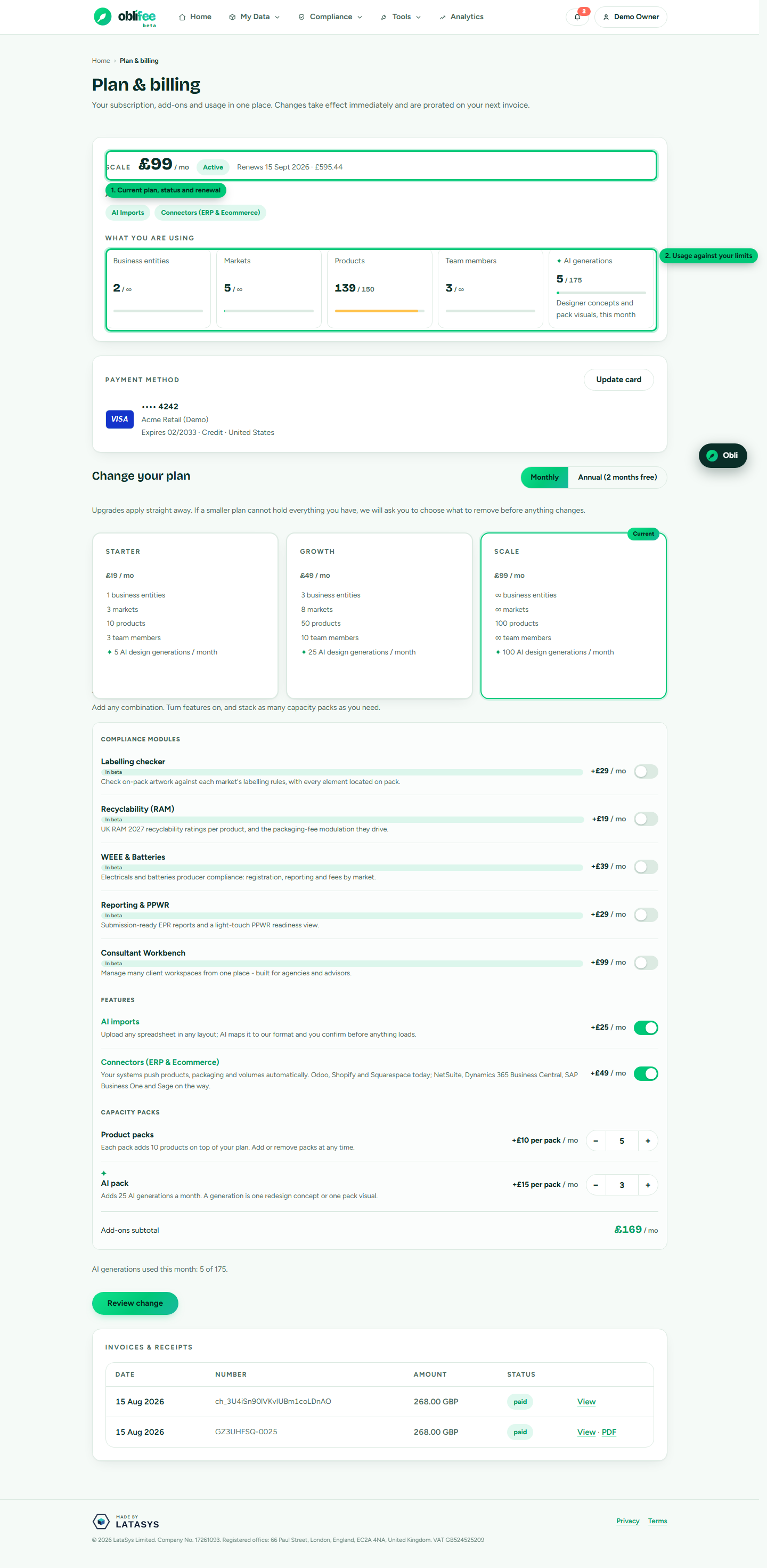
Everything about a running subscription lives on the Billing page (/portal/billing): your
current plan and status, how much of each limit you are using, the card on file, your invoices,
and the Change plan form. This page walks through changing what you pay for and explains the
renewal figure.
:::note Who can change billing Only members with edit rights on the workspace can change the plan or the card. Everyone can view the Billing page. :::
What you can change
From the Change plan form you can adjust any of these in one go:
| Control | What it does |
|---|---|
| Plan | Move between Starter, Growth and Scale |
| Billing cycle | Switch between monthly and annual |
| Modules | Toggle Labelling, Recyclability, WEEE, Reporting or Consultant on or off |
| Capabilities | Toggle AI Imports and Connectors |
| Capacity packs | Step Product Packs and AI Packs up or down |
As you change the toggles and steppers, a live subtotal shows what your add-ons come to. When you are ready, choose Review to continue.
Upgrades apply immediately
Adding capacity — a higher plan, another module, more packs — takes effect straight away. Stripe prorates the difference, so you pay only for the remainder of the current period, and your new limits and modules are available at once.
:::info Add-ons end a trial If you are on a free trial and switch on any add-on, the trial ends and billing begins — add-ons are never free during the trial. See Billing during beta for how this interacts with free beta modules. :::
Downgrades ask before removing anything
Moving to a smaller plan (or dropping a module) can leave you holding more than the target allows — too many businesses, markets, products or users, or data that depended on a capability. Oblifee never deletes anything silently. Instead:
- On Review, if everything fits, the change is applied.
- If you would be over a limit, a confirmation screen lists what is over and asks you to choose exactly which businesses, markets, users or products to remove.
- You must tick an explicit acknowledgement before the change goes through.
- The billing change and the removals happen together — if the payment step fails, nothing is deleted.
:::warning Dropping the Connectors capability If you drop Connectors (ERP & ecommerce), the ERP access tokens for the workspace are revoked, so automatic syncs stop. Your data stays; only the live connection ends. :::
What happens at renewal
At the end of each period, Stripe charges the card on file for the next period, tax included, and your invoice appears in the billing history on this page. If a renewal payment fails, the workspace owners are notified and asked to update the card; your access continues while you sort it out. Billing status is kept in step with Stripe automatically, so the page always reflects reality.
How the "renews on / amount" figure is worked out
The current-plan card shows a line such as "Renews on 14 Sep for £58.80 (incl. VAT £9.80)". That figure is not a guess — it is read from Stripe's preview of your next invoice, so it matches what you will actually be charged:
- The amount is the upcoming invoice total, which includes VAT and any proration from mid-cycle changes — not just the list price of your items.
- The VAT shown in brackets is the tax portion of that total.
- The date is Stripe's next payment attempt for that invoice.
Because it reflects the real upcoming invoice, the figure will already account for a module you added yesterday or a plan you upgraded this morning.
Shopify-billed workspaces
If you installed Oblifee from the Shopify App Store, your subscription is managed by Shopify, not on this page. The Billing page shows your plan and usage and links straight to your Shopify admin billing settings, where you change plan, manage your card and download invoices. Plan changes and card updates are done in Shopify. See Payment methods.
Where to go next
- Plans & modules — the price list you are choosing from.
- Payment methods — the card renewals are charged to.
- Company & VAT details — how the VAT part of the renewal is determined.