Packaging
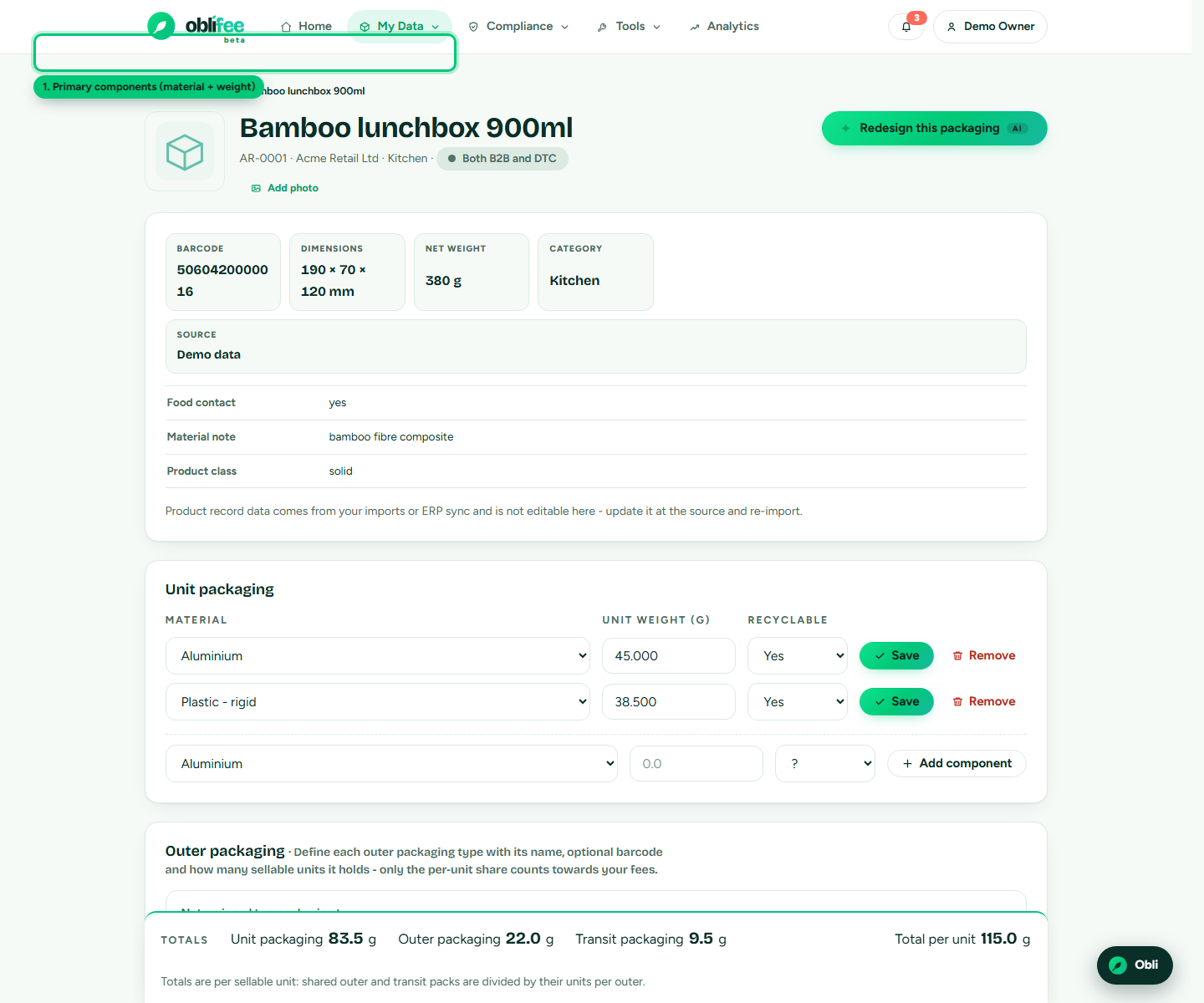
Packaging is where a product turns into an obligation. Oblifee models each product's packaging as a set of components - a material and a weight - optionally grouped into named packs. That structure is what feeds every packaging figure: EPR fees, recyclability (RAM) ratings and PPWR readiness. This page explains how to build it and what each field drives.
The three levels of packaging
Every packaging component is one of three kinds, matching how EPR schemes classify packaging:
| Level | What it wraps | Examples |
|---|---|---|
| Primary | The unit a consumer takes home. | The bottle, the jar, its label and lid. |
| Secondary | Packaging that groups units, often for retail. | A display case, a multipack sleeve, a mailer. |
| Transit | Packaging that moves goods in bulk. | A shipping carton, a pallet wrap, void fill. |
Primary components attach directly to the product. Secondary and transit components belong to a named pack (see below), because a single case or pallet is shared across many units.
Components
A component is the atom of packaging data. Each one records:
| Field | Meaning |
|---|---|
| Component | Primary, secondary or transit. |
| Material | The material code, chosen from Oblifee's material list (e.g. rigid plastic, glass, aluminium, fibre-based composite). The list comes from the regulatory brain, so it lines up with scheme categories. |
| Weight (g) | The weight of that material in that component, in grams. |
| Recyclable | Yes, no, or unknown - your own declaration, used alongside the brain's rules. |
To add a component to a product, open the product page, go to the packaging section, choose the component level, pick a material, enter the weight, and add it. Editing weight, material or the recyclable flag is inline; you can remove a component at any time.
:::tip One material per row Split a component into one row per material. A carton with a plastic window is two rows - the fibre board and the plastic film - so each lands in the right fee category. :::
Packs (secondary and transit)
A pack is a named outer unit - "Retail case", "Shipping carton", "Pallet set". It exists so the maths can share one case across the many products it holds:
| Field | Meaning |
|---|---|
| Name | What the pack is called. |
| Barcode | The pack's own barcode, optional. |
| Units per outer | How many product units go in one pack. Oblifee divides the pack's weight across them. |
| Channel | Whether this pack applies to all routes to market, B2B only, or DTC (direct-to-consumer) only. |
Add a pack, then add its secondary or transit components. Each component you attach inherits the pack's units-per-outer and channel, so the per-unit share stays correct. Change the units-per-outer on the pack and the components update with it.
Channels
Some packaging only applies to some routes to market - a retail display case ships to shops, not to a consumer's door. Each business answers once whether it sells B2B, DTC or both; packs then carry a channel so obligations are counted only where that packaging is actually used.
How packaging feeds compliance
Packaging data is not stored for its own sake - two engines read it continuously.
- EPR fees. Oblifee multiplies each component's weight by the volumes you placed on each market, giving tonnage by material. It applies the cited per-material rate from the regulatory brain to produce a fee. More accurate weights and materials mean a more accurate fee. See Packaging EPR.
- Recyclability (RAM). Where a product's packaging is complete, Oblifee scores it against the UK RAM red/amber/green criteria straight from the brain's cited rules, shown on the product page. See Recyclability (RAM).
:::info Weights drive the money Because fees are weight x volume x rate, the single biggest lever on accuracy is getting component weights right. A rounded-up weight quietly inflates every fee that material touches. :::
Where to go next
- Volumes - the quantities that turn per-unit packaging into tonnage.
- Images & AI - attach packaging artwork and run a label check.
- Packaging EPR - how fees are calculated from this data.
- Recyclability (RAM) - how packaging is rated.
- Bulk import - load packaging rows from a spreadsheet.